Skip to content

Players Worldwide

Esc
Football
/
Club
/
Choose your role
TS LAB Analytics Hub Live

Build a club-branded report in seconds

Six analytics reports and a canvas editor that builds club-branded player reports in seconds, with radars, percentiles and AI insight ranked against your own league.

Made for Sporting Director and Scouting

Analytics Hub: Six analytics reports and AI-built, club-branded player reports.
analytics reports with AI insight
6
analytics reports with AI insight
canvas elements for football data
15+
canvas elements for football data
competitions to benchmark against
800+
competitions to benchmark against

The problem

Analysts spend the week building slides

Exporting stats, fixing charts, re-ranking players against the right league, pasting it all into the club template, and doing it again when someone asks for one more player.

With Analytics Hub

Reports that build themselves, and stay put

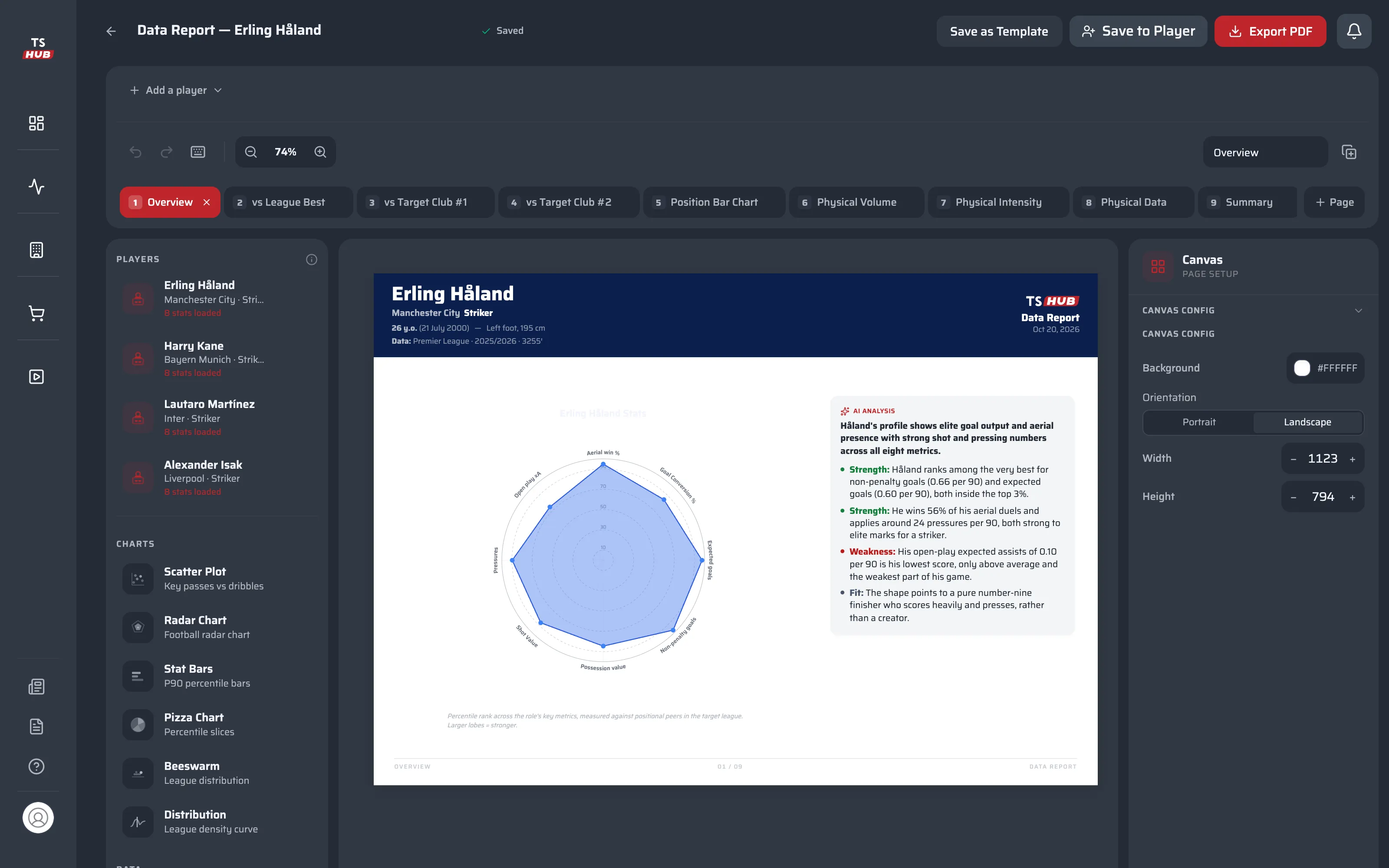
Pick a player, a season, a role profile and a target club. The canvas assembles the charts and the AI insight; you edit, brand and export. Comparisons are frozen at creation, so a report never silently changes.

Professional player reports in seconds

Benchmark against any club, which is exactly what an agency needs when it pitches a player.

Choose player, league and season, the role profile to scout him as and any target club to compare him with. AI Report Generator lays out the canvas; you refine it.

  • 'Scout as' role profiles for every position
  • Any target club in the database as the benchmark
  • Club templates, standard templates and save as template

A canvas built for football data

Every chart can carry an AI Insight block you regenerate at any time.

Radar, pizza, beeswarm, scatter, distribution, position bars, stat bars, summary grid and physical tables, plus branding headers, player context cards, text, images and shapes.

  • 15+ canvas elements, drag and drop
  • Undo and redo, layers, zoom, nudge and keyboard shortcuts
  • AI Insight blocks linked to the chart they explain

Six reports, one click each

Transfer Simulation predicts how a player would perform in another team, based on his history and that team's style.

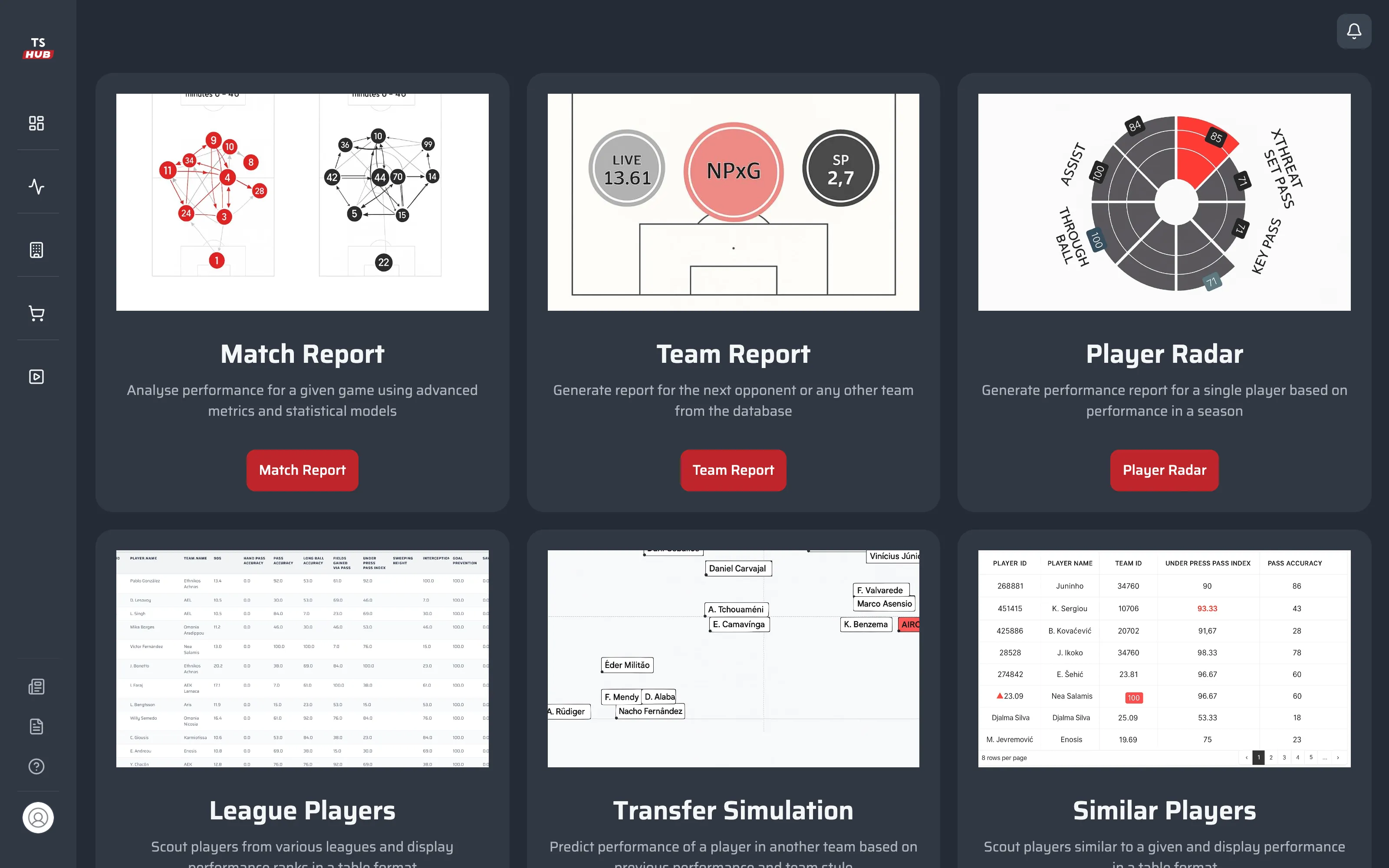
Match Report analyses a single game with advanced metrics. Team Report profiles the next opponent or any team in the database. Player Radar, League Players and Similar Players cover the scouting side.

  • Match Report · Team Report · Player Radar
  • League Players · Transfer Simulation · Similar Players
  • AI analysis in every report
Analytics report catalogue: Match Report, Team Report, Player Radar, League Players, Transfer Simulation and Similar Players, each with a preview and a one-click start button.

Ranked against the league that matters

No more comparing raw totals across different leagues.

Every player is ranked against the target club's league, per 90 and in percentiles vs his position, so a winger in a smaller league and one in a top division read on the same page.

Export, attach, archive

Last month's report still says what it said last month.

Export a club-branded PDF, attach it to the player's Reports tab or keep it in the Reports Hub. Comparisons are frozen at creation, so a report never changes behind your back.

The assistant inside Analytics Hub

Plus Total AI for anything about world football or your own club's records.

  • AI Report Generator

    Pick a player, league and season, a role profile to scout him as and a target club to benchmark against. AI Report Generator builds a club-branded report on a canvas (radars, pizza charts, beeswarms, scatters and physical tables), with an AI Insight for every chart.

    Benchmark against any target club's league · Role profiles and club templates · AI Insight per chart, regenerated any time

More inside Analytics Hub

  • Match Report

    One game, analysed with advanced metrics and models.

  • Team Report

    The next opponent, or any team in the database.

  • Player Radar

    A season-long performance report for one player.

  • League Players

    Rank players from any league in one table.

  • Transfer Simulation

    How he would play in another team's style.

  • Similar Players

    Profiles like the one you pick, ranked by performance.

  • Role profiles

    Scout a player as the role you actually need.

  • Club templates

    Your house style for every position, reused by every analyst.

  • Keyboard-first editor

    Shortcuts for everything; press ? for the list.

Doing it in-house vs. TSH

  • Player report

    In-houseHalf a day in spreadsheets and slides

    With Analytics HubSeconds, from a form to a branded canvas

  • League context

    In-houseRaw totals across different leagues

    With Analytics HubPer-90 and percentiles vs position in the target club's league

  • Opponent analysis

    In-houseA manual pack of stats and clips

    With Analytics HubTeam Report for the next opponent in one click

  • Consistency

    In-houseEvery analyst's own format

    With Analytics HubClub templates and role profiles for every position

  • Audit trail

    In-houseFiles overwritten on a shared drive

    With Analytics HubReports frozen at creation and attached to the player

From raw data to a finished report

  1. 01

    Pick

    Player, league and season, and the role profile to scout him as.

  2. 02

    Benchmark

    Choose the target club; every number is ranked in its league.

  3. 03

    Edit

    Rearrange charts, add AI Insight blocks, apply the club template.

  4. 04

    Share

    Branded PDF, attached to the player and kept in the Reports Hub.

What's next for Analytics Hub

  1. Live

    AI Report Generator with target-club benchmarking

  2. Live

    Six analytics reports with AI insight

  3. Coming soon · End 2026

    Match Lens from TS Vision

    Every episode of a match found in video, clipped and written up automatically.

Questions about Analytics Hub

Can we use our own branding?

Yes. Reports carry your club's branding header, and club templates keep the house style consistent across every analyst and position.

Can we benchmark a player against a club other than ours?

Yes. Any club in the database can be the target, which is how agencies show a player's fit for the club they are pitching to.

Will a report change when new data arrives?

No. Comparisons are frozen when the report is created, so what you sent stays exactly as it was. Build a new report for the latest numbers.

Which leagues are covered?

800+ competitions in the TSH database, with per-90 numbers and percentiles calculated against the league that matters to you.

See Analytics Hub on your own squad

A 30-minute walkthrough on your own club's players and workflow.